
🇬🇧 English
🇫🇷 Français
🇩🇪 Deutsch
🇪🇸 Español
🇮🇹 Italiano
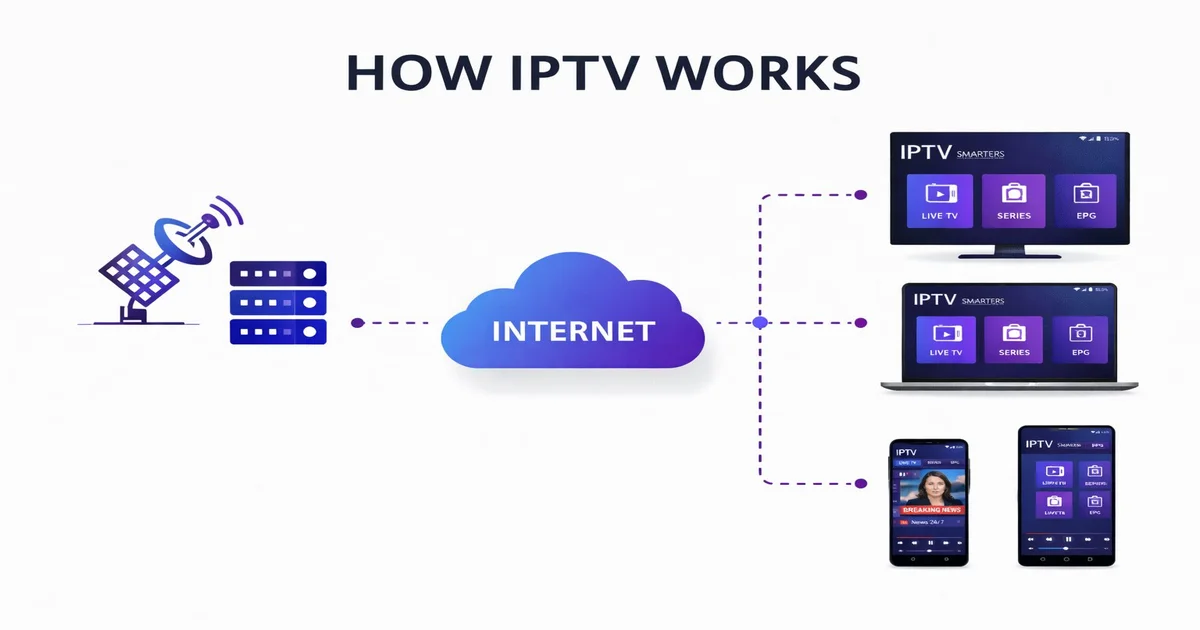
You have probably heard the term IPTV many times in recent years. Maybe a friend told you about it, or you saw an ad promising thousands of live channels for a fraction of the cost of cable. But what exactly is IPTV, how does it work under the hood, and is it the right choice for you in 2026? This comprehensive beginner's guide answers every question you might have. We will walk you through the technology, the different types of services, the devices you can use, and how to get started with your first IPTV subscription today.
IPTV stands for Internet Protocol Television. In the simplest terms, it is a method of delivering television content over the internet instead of through traditional terrestrial, satellite, or cable formats. Rather than receiving a broadcast signal through an antenna on your roof or a coaxial cable plugged into a set-top box, your TV content arrives as data packets over your broadband internet connection, the same connection you use to browse websites and stream music.
The concept is not entirely new. Internet-based video services have been around for over a decade, but IPTV has evolved dramatically. In 2026, modern IPTV platforms deliver tens of thousands of live channels in resolutions up to 4K Ultra HD, alongside massive libraries of on-demand movies and series. The experience rivals and often surpasses what traditional pay-TV providers offer, at a fraction of the cost.
What makes IPTV different from platforms like YouTube or Netflix is its focus on live television. While Netflix specialises in on-demand content, IPTV gives you real-time access to news broadcasts, live sports events, entertainment channels, and much more from every corner of the globe. Think of it as having every cable package from every country, all delivered through your internet connection.
Understanding the technical side of IPTV helps you appreciate why it works so well. At its core, IPTV uses the same fundamental technology as any internet-based service: the Internet Protocol (IP). Content is broken into small data packets, transmitted over IP networks, and reassembled on your device for playback.
Here is how the process works step by step:
The entire journey from satellite dish to your screen happens in a matter of seconds, which is why a stable and reasonably fast internet connection is the single most important requirement for a great IPTV experience.
Not all IPTV is the same. The technology supports several distinct service types, and most modern providers like IPTV SmartHD bundle all of them into a single subscription.
This is the most popular form of IPTV. Live IPTV streams television channels in real time, just like traditional cable or satellite. You tune into a channel and watch the broadcast as it happens. This is how you watch live sports, breaking news, and prime-time entertainment. With a service like IPTV SmartHD, you get access to over 30,000 live channels spanning every genre and country imaginable.
VOD gives you access to a massive library of movies and TV series that you can watch whenever you want. Unlike live TV, VOD content is stored on the server and delivered to you on request. IPTV SmartHD offers over 90,000 VOD titles, including the latest Hollywood releases, classic films, popular series, and documentaries, all in HD and 4K quality.
Catch-up TV, also known as time-shifted television, allows you to go back and watch programmes that have already aired. If you missed last night's football match or a popular show, the catch-up feature lets you replay it within a certain time window, typically 24 to 72 hours after the original broadcast.
Interactive IPTV takes the experience a step further by letting you interact with the content. This can include features like multi-angle camera views during sports events, in-programme voting, on-screen statistics, or integrated shopping. While still emerging, interactive IPTV is becoming more common in 2026.
Getting started with IPTV requires three essential components. The good news is that you probably already have most of them.
Since IPTV streams content over the internet, your connection speed directly affects the viewing quality. Here are the minimum recommendations:
You need a device capable of running an IPTV application. This can be a Smart TV, an Android TV box, an Amazon Fire TV Stick, a smartphone, a tablet, or even a computer. We cover compatible devices in detail in the next section.
Finally, you need a subscription from a reputable IPTV provider. Your provider will give you login credentials (M3U URL or Xtream Codes details) that you enter into your IPTV app to access the channels. IPTV SmartHD offers flexible plans with no long-term contracts, starting from just a few euros per month.
One of the biggest advantages of IPTV over traditional cable or satellite is device flexibility. You are not locked into a single set-top box. Here is a rundown of the most popular devices for IPTV in 2026:
Most modern Smart TVs come with app stores that let you install IPTV players such as IPTV Smarters Pro, TiviMate, or Smart IPTV. Samsung Tizen and LG webOS both support IPTV apps, making it easy to watch directly on your big screen without any additional hardware.
The Fire TV Stick is one of the most popular IPTV devices worldwide. It is affordable, compact, and plugs directly into your TV's HDMI port. You can sideload IPTV apps or download them from the Amazon Appstore. The Fire TV Stick 4K Max supports Ultra HD streaming with Dolby Vision.
Dedicated Android TV boxes like the NVIDIA Shield, Formuler Z11, or BuzzTV offer powerful hardware specifically designed for media streaming. They typically feature more storage, faster processors, and better remote controls than budget streaming sticks.
IPTV apps are available on both Android and iOS, letting you watch on the go. Apps like IPTV Smarters and GSE Smart IPTV work seamlessly on phones and tablets, making your IPTV subscription truly portable.
On a computer, you can use media players like VLC, Kodi with IPTV add-ons, or web-based players to access your IPTV service. This is a great option when you are travelling and have your laptop with you.
MAG devices are dedicated IPTV set-top boxes made by Infomir. They run a custom Linux-based firmware designed exclusively for IPTV, offering a fast and reliable viewing experience with built-in EPG support and portal-based navigation.
How does IPTV stack up against traditional cable and popular streaming platforms like Netflix? The table below breaks it down across the criteria that matter most to consumers:
| Feature | IPTV | Cable TV | Netflix |
|---|---|---|---|
| Monthly cost | From €14.99 | €30 – €100 | €13 – €20 |
| Live channels | 30,000+ | 50 – 500 | None |
| On-demand library | 90,000+ titles | Limited VOD | ~15,000 titles |
| 4K content | Yes, included | Very limited | Premium plan only |
| Live sports | All major leagues | Depends on package | Very limited |
| International channels | 50+ countries | Add-on packages | Regional content only |
| Contract required | No contract | 12 – 24 months | No contract |
| Device compatibility | Any device | Cable box only | Any device |
| Simultaneous connections | 1 – 2 included | 1 per box | 1 – 4 depending on plan |
As you can see, IPTV delivers the broadest combination of live channels, on-demand content, and international coverage at the lowest price point. Cable TV cannot match the channel count, and Netflix does not offer live television at all.
The IPTV industry has matured significantly, and the benefits for subscribers in 2026 are substantial:
With over 30,000 live channels, IPTV gives you access to content from more than 50 countries. Whether you want to watch English Premier League football, German Bundesliga, Italian Serie A, French Ligue 1, American NFL, Formula 1 racing, or cricket from South Asia, everything is available in a single subscription.
Gone are the days of blurry, buffering IPTV streams. Modern providers use advanced CDN infrastructure and H.265 encoding to deliver consistent Full HD and 4K picture quality. With a decent internet connection, the viewing experience is indistinguishable from satellite or cable.
IPTV is a game-changer for expatriates, multilingual households, and anyone interested in international content. You can access channels from your home country anywhere in the world, watch news in your native language, and explore entertainment from cultures across the globe.
Traditional cable packages with premium sports and movie channels can easily exceed €80 per month. A comprehensive IPTV subscription with far more content typically costs under €15 per month. That is a saving of over €700 per year while getting access to ten times the content.
Most IPTV services, including IPTV SmartHD, operate on a no-contract basis. You pay month to month and can cancel at any time. There is no need for a technician to install a satellite dish or run cable through your walls. You simply download an app, enter your credentials, and start watching.
Ready to experience IPTV for yourself? Here is how to get started with IPTV SmartHD in just a few minutes:
The entire setup takes less than five minutes, and our support team is available via WhatsApp around the clock to help you if you need assistance.
For standard definition, 5 Mbps is sufficient. For HD quality, we recommend at least 15 Mbps, and for 4K streaming, 25 Mbps or more. If multiple people in your household will be streaming at the same time, a connection of 50 Mbps or higher is ideal.
Yes. IPTV SmartHD subscriptions support multiple connections depending on your plan. You can watch on your Smart TV, phone, tablet, or computer. Multi-device plans allow simultaneous streaming on two or more devices.
IPTV technology is completely legal. Major services like YouTube TV, Hulu Live, and Sling TV are all IPTV-based. The legality depends on whether the provider is licensed to distribute the content. Always choose a reputable provider with clear terms of service.
M3U is a simple playlist file that contains direct URLs for each channel. Xtream Codes is an API-based system that provides a server URL, username, and password, offering additional features like EPG, catch-up TV, and automatic channel list updates. Xtream Codes is the preferred method for most users.
Yes. IPTV SmartHD offers a free 24-hour trial so you can test the full service before purchasing a plan. Visit our trial request page to get started. No credit card is required.
IPTV has fundamentally transformed how millions of people watch television around the world. It delivers more channels, better quality, greater flexibility, and significantly lower costs than traditional cable or satellite. Whether you are a sports fan who wants access to every league on the planet, an expat longing for channels from home, or simply someone looking for a smarter and more affordable way to watch TV, IPTV is the answer.
IPTV SmartHD makes getting started effortless. With over 30,000 live channels, 90,000+ on-demand titles, 4K quality, and instant activation, you can be watching within minutes. Explore our subscription plans, browse our full channel list, or request your free 24-hour trial to experience the future of television today.
See for yourself: 30,000+ channels, 4K quality, instant activation. No credit card required.
Start Free Trial Now